Mateo GarciaEditor

Mateo GarciaEditor
There’s a tool that helps websites load faster, survive traffic spikes, and put less pressure on the origin server. It’s called a CDN — and despite the serious acronym, the idea is very down-to-earth: keep content closer to the people who consume it.
This topic has two perspectives, and both matter. For a regular user, it’s binary: “did the page open fast or not?” For an engineer, it’s more nuanced: your server metrics can look perfectly green, yet the site still feels slow — not because of CPU, but because of distance, network latency, and the path a request has to travel.
A CDN is what bridges that gap between “the server is fine” and “users are complaining.”
CDN (Content Delivery Network) is a network of servers that delivers content from the closest point to the user, rather than from a single central origin. The easiest analogy is a second storefront — except it’s not in one location, but dozens of them. The product is the same, but it’s physically closer to the buyer, so “time-to-eyes” is much faster.
One important note: a CDN isn’t magic, and it doesn’t replace your server. Your origin remains the source of truth — where your application, data, and business logic live. The CDN takes over what makes sense to serve from cache: images, CSS, JavaScript, fonts, video, and sometimes even full pages — if you configure it correctly.
Why does this speed things up? Because real-world performance isn’t just about server horsepower. Even if the server responds instantly, the request still has to reach it and come back. The farther the user is, the higher the latency — and “small” delays quickly add up into seconds. A CDN shortens the path: part of the content is served from a nearby edge node, and the site feels faster.
There’s a second effect — on your infrastructure. The more content is delivered from CDN edge nodes, the fewer requests reach the origin. That means fewer spikes, a lower chance of hitting limits, and more consistent response times when traffic suddenly ramps up.
Put simply, teams usually add a CDN for three reasons:
Next, we’ll break down the mechanics without unnecessary theory: how a request flows through a CDN, what edge nodes actually are, and why caching can sometimes save you — and sometimes get in your way.

Inside a CDN, there are two key points: the origin and the edge nodes. If you have a clear mental model of those two, everything else (TTL, headers, cache purges) starts to click into place.
The origin is your “source of truth” — the place where the authoritative, up-to-date content lives. That can be your web server, object storage, or a load balancer in front of your application. The specific technology matters less than the role. When the CDN can’t serve a response from cache, it fetches it from the origin. The origin also sets the rules of the game: which responses can be cached, for how long, and under which conditions caching must be bypassed (we’ll cover that in the next section).
Edge nodes are the CDN servers located closer to users. You typically don’t manage them directly — the CDN provider operates them. Their job is simple: accept requests and, as often as possible, respond without going back to the origin.
To make this less abstract, imagine an online store selling monitors. The pages are heavy: photos, thumbnails, banners, fonts, scripts. A user opens a product page and the browser pulls dozens of resources. With a CDN, requests for those resources hit the nearest edge node first — and then one of two things happens:
Why does this noticeably speed up page loads? Because edge delivery reduces more than just “file download time.” It also cuts network overhead: connection setup, TLS handshakes, and round-trip latency. When the edge node is physically closer, the cumulative waiting time drops — especially on pages with lots of small assets.




One more important nuance: a CDN doesn’t cache “the whole site.” It caches specific responses to specific requests. Cache keys are tied to the URL and request conditions. So if you make requests overly “unique” (for example, by adding unnecessary query parameters), caching becomes less effective — and the CDN will have to hit the origin more often.
The result is a clean division of labor: the origin handles what truly needs fresh logic and data (cart, accounts, pricing, inventory), while the edge handles high-volume delivery of repeatable content.
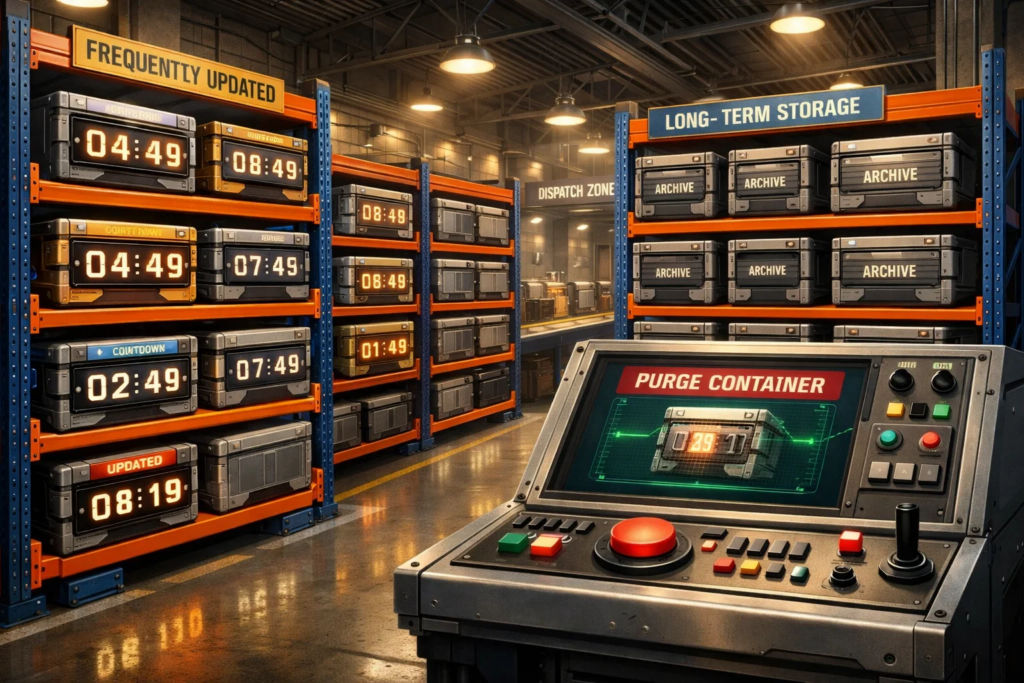
A CDN speeds up a site only as long as caching behaves predictably. And predictability comes down to three things: how long an object lives in cache, what rules the CDN uses to decide “cacheable or not,” and what you do when you update content and want users to see it right now.
Let’s start with TTL — the cache “expiration date” (time to live). For example, if an image has a 24-hour TTL, an edge node can serve it from cache for a full day without contacting the origin. When the TTL expires, the CDN either fetches a fresh version or revalidates to see whether it changed. Longer TTLs increase cache hit rates and reduce origin load — but there’s a trade-off: after an update, users may keep seeing the old version for a while. That’s why TTL is usually set by asset type: things that rarely change can live longer; things that change often should have shorter TTLs.
Next are cache headers — the headers your origin returns with the response so the CDN (and the browser) know how to handle it. These are the cache’s “behavior rules”: whether the response can be stored, for how long, whether it must be revalidated, and what counts as a unique version. It’s easy to fall into two extremes here. If the rules are too conservative, caching barely works and the CDN provides limited value. If they’re too aggressive, you can accidentally cache something that should be dynamic — and end up with “why are users seeing stale data?”
Finally, there’s purge — forcing the cache to be cleared when you don’t want to wait for TTL. A typical e-commerce scenario: you update a banner or replace product photos, but some users keep seeing the old version. Purge lets you evict an object from edge cache (by a specific URL or a pattern), so the next request goes back to the origin and pulls the current content.
To make this easier to internalize, here’s a quick table:
| Mechanism | What it controls | When to use it |
| TTL | “How long something can stay cached” | When content changes rarely and you want maximum cache hit rate |
| Cache headers | “What to cache — and under which rules” | When you need precise cache control: separating static vs. dynamic content |
| Purge | “Update right now” | When you’ve shipped changes and don’t want to wait for TTL to expire |
If we boil it down to a single mental model: TTL sets the lifetime, headers set the rules, and purge solves urgent updates.
Next, it makes sense to talk about the boundaries: when a CDN delivers maximum value — and when it barely helps, or can even create problems if your expectations don’t match reality.

CDNs are often sold as a universal “website accelerator,” but in practice they shine in very specific scenarios. If you understand where they’re strong, you get excellent results. If you expect the impossible, disappointment is almost guaranteed.
A CDN delivers the most value when there’s a lot of repeatable content and a lot of users requesting it. For an online monitor store, that’s the default case: product images, thumbnails, banners, CSS, JavaScript, fonts — all requested by thousands of people and not changing every minute. In these situations, edge caching genuinely offloads the origin: you “bring it to the edge” once, and then serve it fast at scale.
The second scenario is a geographically distributed audience. If your origin lives in one region but customers come from all over the world, then without a CDN every request has to travel a long round trip. A CDN shortens the path to a nearby edge node, and the site feels faster even without changes to the application.
The third scenario is traffic spikes. It doesn’t have to be a viral explosion — it can be a marketing campaign, a sale, or a product review from an influencer. A CDN helps by absorbing the shock: repeatable assets are served from cache, and the origin doesn’t drown in a flood of identical requests.
But there are cases where a CDN won’t do much — and that’s normal.
If a page is mostly dynamic and user-specific (account dashboards, individual pricing, personalized recommendations, shopping carts), you can’t cache it “as is” — or you must do it very carefully. A CDN can still help with static parts (CSS, JS, images), but the core workload — server-side logic and the database — still lives on the origin.
Another common trap is expecting a CDN to fix a slow backend. If your server takes 2–3 seconds due to heavy database queries, a CDN won’t magically turn that into 200 milliseconds. It can speed up static delivery and reduce noise on the origin, but it won’t cure poor application performance.
And finally, a CDN can actually get in the way if caching is configured poorly. The most frustrating scenario is when part of your audience gets “stuck” on an old version of content. That usually happens because TTLs are too long, cache headers are wrong, or dynamic and static responses are mixed incorrectly. So a CDN isn’t “set it and forget it.” It’s a tool that requires basic discipline: knowing what you cache — and how you control it.
A CDN isn’t used only for speed. In practice, it often becomes the first line of defense: edge nodes absorb all public traffic, smooth out load spikes, and filter some “garbage” requests before they ever reach the origin. If you’ve experienced “we went down not because the server was weak, but because traffic suddenly jumped 10×,” you already know why that matters.
But it’s easy to overestimate what a CDN can do. A CDN doesn’t replace real application security: it won’t “fix” vulnerabilities in your code, and it won’t magically become a WAF if your provider doesn’t offer those capabilities. What it does provide are delivery-layer controls: basic overload protection, rate limiting (if supported), filtering of some bots/anomalies, and a convenient choke point where you can centrally enforce HTTPS/TLS, HSTS, and other security hygiene settings.
The most common failure is enabling a CDN while leaving the origin directly reachable. In that case, some traffic (and attacks) can bypass the edge entirely — and you lose the whole “shield” concept: caching doesn’t help, filtering doesn’t apply, and the server takes the hit again. That’s why in production, teams usually “hide” the origin: restrict inbound requests by CDN/load balancer IP ranges, block direct access to sensitive endpoints, separate public and internal entry points, and sometimes add extra layers like an origin shield (where even edge requests go through a protective layer/cache closer to the origin).
Bottom line: a CDN can absolutely improve security — but only where it actually controls the inbound flow. It speeds up delivery and reduces your delivery-layer attack surface if you force all public traffic through the edge and remove bypass paths.

We’ve already covered how a CDN serves content from edge cache, what controls caching behavior (TTL, headers, purges), and why it has a huge impact in some scenarios but barely helps in others. We also discussed when a CDN can act as a “shield,” and why it’s critical not to leave a bypass path to the origin.
Now for the most practical part: what to review in your configuration so the CDN actually speeds up the site, updates roll out without surprises, and the origin doesn’t absorb unnecessary traffic.
Below is a short checklist that helps you quickly validate basic CDN hygiene:
| Check | Why it matters | Quick sign it’s OK |
| Static assets actually go through the CDN (images, CSS, JS, fonts) | This is the main source of speed-up and origin offload | Most requests for static content are served from the edge, not the origin |
| Static vs. dynamic responses are separated correctly | Prevents caching things that must remain “live” | Cart/account/user-specific pricing doesn’t get “stuck” in cache |
| TTL values are set intentionally | Balances speed with freshness | Frequently changing content has short TTLs; rarely changing assets have long TTLs |
| Cache headers are explicitly configured | So the CDN doesn’t have to guess default behavior | Cache behavior is predictable: it’s clear what’s cached and for how long |
| There’s a clear update process (purge / asset versioning) | Prevents releases from turning into “some users still see the old version” | After updates, content refreshes immediately or within an expected window |
| URLs and query parameters don’t destroy cache efficiency | Overly “unique” URLs cause constant cache misses | The same asset has a stable URL without unnecessary parameters |
| The origin is protected from direct CDN bypass (where it matters) | Prevents traffic from skipping the edge and overloading the origin | Core static content isn’t served directly from origin, bypassing the CDN |
| Basic cache metrics are tracked (hit/miss, traffic, latency) | Without measurement it’s hard to tell if the CDN helped | Hit rate trends up while origin load trends down |
| The CDN isn’t treated as a cure for a slow backend | A CDN accelerates delivery, not database latency | Dynamic-path latency is measured and optimized separately |
If your answer is a confident “yes” across the checklist, the CDN usually starts behaving the way people expect: the site feels faster, traffic spikes become less dramatic, and the origin stops being the bottleneck for static delivery. And if some items are “not sure,” those are often the exact areas where you can get the biggest gains with minimal effort.
Now that we’ve gone from the core CDN idea down to real configuration, it’s time to summarize and move to the conclusion.

A CDN is like a bypass road around traffic: repeatable content takes the “fast route,” while the origin server doesn’t choke on the same requests over and over again.
At the same time, a CDN won’t perform miracles where miracles aren’t possible. It won’t speed up a slow backend, and it won’t turn dynamic responses into static ones with a snap of your fingers. What it does do exceptionally well is deliver repeatable content quickly and reliably — without unnecessary load on the origin — as long as you manage caching intentionally.
The takeaway is simple: a good CDN isn’t “plug it in and forget it.” It’s “enable it and define the rules.” Get TTLs right, set cache headers deliberately, have a clear update process — and you end up with a site that loads snappily for users, rides out spikes calmly, and doesn’t force your infrastructure into constant firefighting mode.