Mateo GarciaEditor

Mateo GarciaEditor
Today’s topic is one of those things everyone has heard about, but it usually stays “behind the scenes”: cloud networking. And to keep this from turning into a dry textbook, let’s look at networking through a Cyberpunk 2077 lens — where netrunners literally “live” inside networks, hop between nodes, find routes, and slip into places they’re not welcome.
In real cloud environments there are no glowing tunnels or digital demons, but the logic is similar: a network is the space where traffic moves according to rules. And if the rules don’t exist (or they’re poorly designed), you end up with either “everything is open to everyone” — or “nothing can talk to anything.”
So cloud networking isn’t there because “that’s how it’s done.” It solves three very practical problems:
Isolation. You rarely want everything talking to everything. Most architectures have distinct zones: databases separate, application tiers separate, admin interfaces separate, test environments separate. Networking lets you enforce those boundaries so a simple mistake doesn’t turn an internal service into a public one.
Traffic routing control. Traffic in the cloud doesn’t “flow wherever it wants.” You define the rules: what can communicate internally, what can reach the internet, how services discover each other, and which gateways and routes they must use.
Secure access and integrations. You almost never live in a single network forever. External services appear, a second cloud comes into play, there’s an office network, partners, separate projects. Networking defines how you connect all of that without turning your infrastructure into an open hallway.
To make it concrete, let’s use a simple example from a “cyberpunk economy.” Imagine an online store called BrainDance Hub that sells braindances (digital recordings of experiences). The store has a storefront (website), a backend, payments, a digital content warehouse, and analytics. Networking determines the basics:
If you don’t design this intentionally, you get two extremes. Either the system is leaky (someone discovers internal resources from the outside), or it’s stone-solid (even your own services can’t exchange data properly).
We’ll move through this like a map: first we’ll build the network “frame” (VPC/VNet, subnets, IP addressing), then we’ll break down how traffic moves internally (routes, route tables, gateways), then how different networks are connected (peering and private links), and finally how to send traffic to the public internet safely (NAT and public IPs).
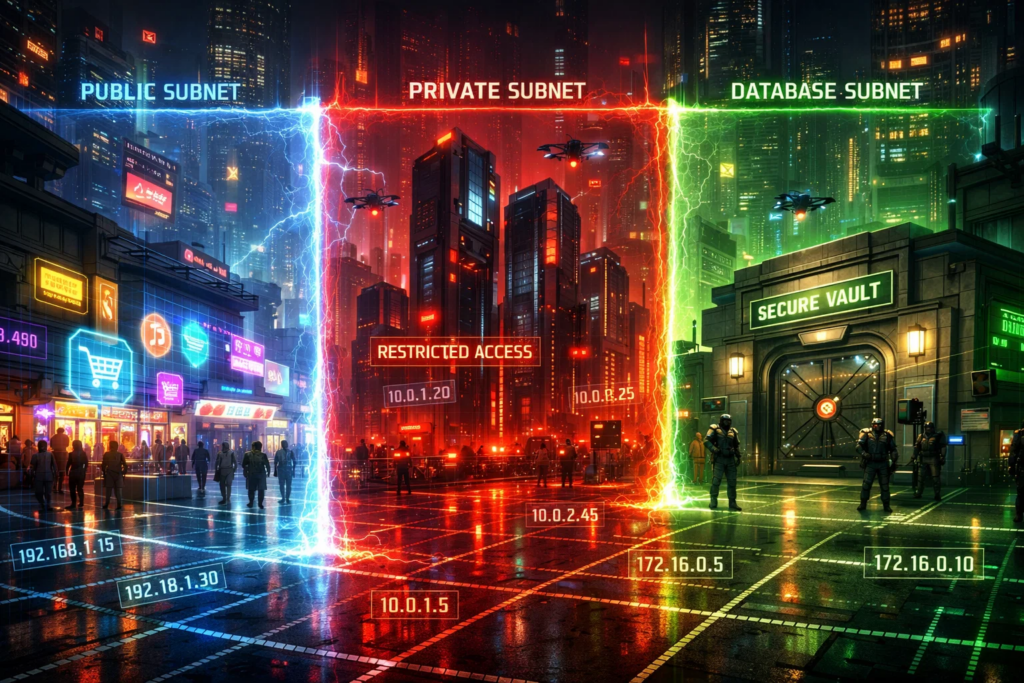
Let’s imagine BrainDance Hub gets its own “digital district” in the cloud — a dedicated space where all its services live. That space is your VPC/VNet: a private cloud network, isolated from other projects and other tenants. You can think of it as a gated area with its own streets and traffic rules.
Why does the store need this in practice? To cleanly separate the public storefront from the internal back room. The website and public API should be reachable by visitors. But the order database, admin panel, internal payment-processing services, and the master content storage should not. A VPC/VNet enforces that separation through architecture, not promises: inside the network, services can reach each other; from the outside, access exists only where you explicitly allow it.
Within that network, you then split things into subnets. If the VPC/VNet is the whole district, subnets are the neighborhoods. They’re usually divided by purpose and by “publicness.”
For example, one neighborhood is for components that must accept inbound traffic (the storefront, an API gateway, a load balancer). Another is for internal services (order processing, download-link generation, recommendation services). A third is for data (databases, caches, queues). The idea is simple: even if someone reaches the “public street,” it doesn’t automatically mean they can walk into the “vault district.”
To make all of this work, you need IP addressing — a plan for which addresses exist inside your cloud district. The key point is that in most cases you choose a range of private IPs that are routable within the VPC/VNet. These addresses are used for internal communication: the order-processing service talks to the database, the API talks to the cache, workers read jobs from a queue — all over private IPs, without going through the public internet.
Why isn’t an address plan a small detail? Because it shapes everything you do next:
If you pick address ranges “by feel” and make them too tight, you’ll hit weird limitations surprisingly fast: you need to add services but run out of IPs; you need to connect two networks but the CIDR blocks overlap; you want segmentation but everything is already mixed together.

So BrainDance Hub has its own “district” (a VPC/VNet). Inside it are subnet “neighborhoods,” and every service has a private address. But that’s not enough. Next comes the question every real city has to answer: how do vehicles actually move? In networking terms: who decides where traffic goes, and what happens when a service needs to reach beyond its own subnet?
In cloud networking, three building blocks handle this: routes, route tables, and gateways.
A route is a simple rule like: “to reach network X, send traffic to Y.” A route table is a collection of those rules attached to a subnet. And that route table defines how traffic from that subnet is allowed to move: only within the VPC/VNet, to another subnet, to another segment, to the internet, to a VPN — anywhere — but strictly according to the defined rules.
In the store example, it’s very practical. The storefront (website) may have a public entry point, but the application must talk to an internal order service and a database. The internal service talks to a task queue. Workers talk to object storage where the braindances live. All of that is internal traffic that should move over private IPs and never leak outside. Route tables enforce exactly that: they ensure “internal stays internal,” instead of accidentally turning into traffic that detours through the public internet.
A gateway is a “gate” that gives your network access to something external — for example, the public internet or another network. A route by itself doesn’t create an exit; it only tells traffic where to go. A gateway is the actual point that makes the exit possible.
That’s why the typical cloud workflow is: you decide which subnets should have outbound access — and which should not. This is critical, because many security problems don’t start with a “hack,” but with traffic flowing where it shouldn’t. If a database subnet suddenly has a route to the internet, and somewhere else a port is opened carelessly, you’ve just moved yourself closer to an incident.
One more practical point: in the cloud, “internal traffic” doesn’t automatically mean “safe traffic.” It just means internal. If an attacker compromises one service inside the network, they can move along the same routes as legitimate traffic. That’s why routing is also about segmentation: who is allowed to talk to what, and through which controlled choke points.
Bottom line: routes and route tables define how traffic moves between subnets and outward, while gateways define which “doors” connect your network to the public internet or to other networks.


Let’s say the business grows. You spin up a separate analytics project, a dedicated test environment, a partner network that powers recommendations, or a second region “just in case.” And you quickly run into a practical question: how do you connect two networks so services can communicate — without making things unnecessarily public?
The simplest way to “connect everything to everything” is to expose a service publicly and talk over the internet. But that’s usually a bad habit: it increases your attack surface, makes you dependent on the public network, and reduces your control. That’s why cloud architectures almost always aim to connect networks privately whenever possible.
Peering is essentially a “bridge” between two networks (two VPCs/VNets) that allows them to route traffic to each other over private IP addresses. The convenience is that services can communicate almost as if they’re in one large “district,” even though they’re technically in separate networks.
In our store example, this is useful when you split infrastructure by purpose: production in one network, analytics in another, and a test environment elsewhere. Production services can send events to the analytics network without exposing databases or internal APIs publicly. Or a recommendation service living in a separate network can pull the data it needs from production over a private path — again, without publishing anything to the internet.
But peering is not “magic network merging.” There are a few practical nuances.
Address ranges must not overlap. If you chose the same CIDR ranges in different networks, peering will be impossible — or it will turn into painful rework.
Peering doesn’t mean “everything is allowed.” It provides routing, but access controls and segmentation still decide which subnets and services can actually talk to each other.
At scale, peering can create a messy network mesh if you connect everything to everything without a design. That’s why it’s typically used deliberately — either through a hub-and-spoke model or on a “connect only what you need” basis.
Sometimes peering isn’t a good fit. For example, you may need to connect the cloud to an office network, an on-prem data center, or another site — or security/compliance requirements may forbid using the public internet even with encryption. In those cases, you use private connectivity.
The concept is straightforward: instead of routing “over the internet,” you route over a private link — essentially a dedicated line between environments. That gives you more predictable latency, better stability, and often tighter traffic control. The “line” can be physical (literally a dedicated circuit) or virtual (for example, a VPN).
For BrainDance Hub, this becomes relevant if some systems (say, accounting or warehouse operations) remain outside the cloud but still need to communicate with cloud services. Or if the company grows and wants strict separation for critical environments: the production network connects to external sites not “however it happens,” but through a controlled private channel.
In short: peering is a fast, convenient way to connect two cloud networks privately within the cloud, while private links are the option for more serious requirements and cross-site connectivity.
Next, we’ll cover the last piece of the puzzle: how services reach the public internet without turning internal components into public ones. That’s where NAT, public IPs, and common outbound patterns come in — and that’s exactly what we’ll break down in the next section.

BrainDance Hub needs the internet all the time. The website must accept requests from customers. The payment provider needs to deliver webhooks. Workers need to download updates, call external APIs, send emails and push notifications, or publish events to third-party services. But that doesn’t mean every server — or every database — needs a public IP address.
A public IP is typically needed wherever you expect inbound traffic from the internet. In the store’s case, that’s the “storefront”: the website, a public API, and possibly an endpoint for receiving webhooks.
The key principle is simple: only make public what must be public. Everything else should stay in private subnets with no direct inbound access from the outside. It sounds obvious, but this is exactly how you avoid the classic “we accidentally exposed an internal service” scenario.

Now for one of the most useful terms in cloud networking: NAT (Network Address Translation). Put simply, NAT allows services with private IPs to access the internet without becoming reachable “from the street.”
Here’s how it works. An internal service initiates an outbound connection (for example, a worker calls an external API). At the network edge, NAT rewrites the source address to a public one and sends the traffic to the internet. When the response comes back, NAT knows where to forward it, and the return traffic is delivered to the right private service inside your network.
The key concept is connection initiation. NAT is great for outbound traffic, but it generally doesn’t allow unsolicited inbound traffic from the internet into private networks. And that’s exactly why it’s so useful: your private services can reach the outside world, while the outside world cannot reach them directly.
For BrainDance Hub, this is the ideal pattern for workers and internal services. They can call payment APIs, notification providers, and third-party services — without being publicly exposed and without needing public IP addresses.
To make everything work securely — without surprises — teams typically follow this logic:
One non-obvious point: NAT is not “magic security.” It doesn’t replace access controls, it doesn’t fix weak authentication, and it won’t save you from leaked keys. What it does is help you separate two worlds correctly — public and private — so internal services can reach the internet when needed, without being publicly exposed.
If we summarize: public IPs are for services that must accept inbound traffic. NAT is for services that should stay private but still need outbound connectivity. The cleaner you separate these patterns, the easier both security and operations become.

A cloud network isn’t “a checkbox configuration.” It’s the structural frame that defines who can talk to whom, where traffic is allowed to flow, and what is considered public in the first place. A VPC/VNet sets the boundaries of your “district,” subnets and IP addressing split it into neighborhoods, routes and gateways define the traffic rules, and peering or private links connect separate networks without unnecessary public exposure.
The final touch is internet access. The fewer components that have public IPs, the easier life becomes: only what truly needs to accept inbound traffic is exposed, while everything else stays private and reaches the outside world through NAT only when necessary.
If you remember just one idea, make it this: a well-designed cloud network is one where everything necessary works — and everything unnecessary is simply unreachable.
Thanks for reading!