Mateo GarciaEditor

Mateo GarciaEditor
Health checks are the checks a cloud system uses to decide whether a backend is still alive or not. They are not there as a formality, but for a very practical purpose: to determine whether traffic can still be sent to that node, whether it should remain in the pool, or whether it is time to switch over to a standby path. In load balancers, DNS failover, and self-healing mechanisms, these checks are exactly what become the signal for the next action.
That is why failover, in practice, does not work properly without them.
If the system cannot distinguish between a healthy service and a backend that is hung, partially broken, or simply unavailable, it will either keep sending traffic to a dead endpoint for too long or fail to understand when it is time to switch over at all.
Here is a short summary of why these checks matter in the first place:
| Without checks | With checks |
| The system does not know whether the service is alive | There is a signal that it is time to remove the node from traffic |
| Failover happens too late or does not happen at all | Switchover can begin automatically |
| Traffic keeps flowing into a broken backend | The failed node is removed from the pool |
| The team is left hoping for manual reaction | There is a basis for an automatic decision |
But there is one important nuance here: “the server is responding” and “the service is actually ready to handle requests” are not the same thing.
A check can operate at different levels. It may look at:
This matters because not every check truly reflects the real state of the service.
For example, the server may still respond on the network level, the port may still be open, but the application itself may already no longer function correctly. To the system, that node still looks “alive,” even though users are already receiving errors.
That is exactly why failover works poorly without proper health checks.
The system either continues treating a broken node as healthy for too long, or it never clearly understands that traffic should already be switched over to a standby path.
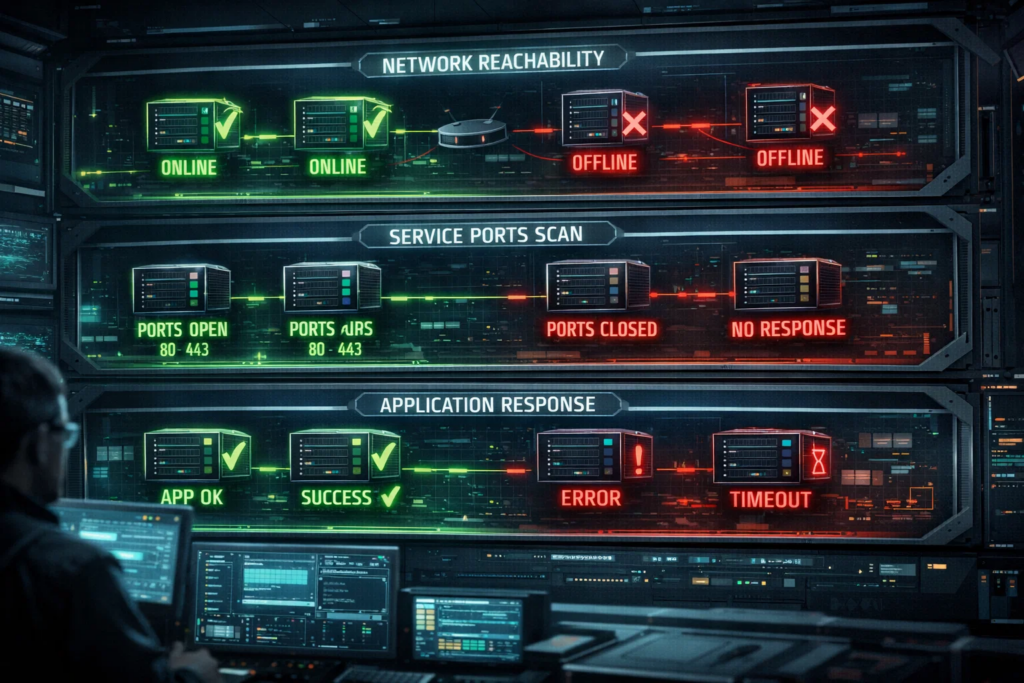
In the previous section, we briefly covered the core idea: why health checks matter and why failover works poorly without them. Now we can move to the mechanics themselves and look at how these checks are actually structured and what they really evaluate.
A health check exists for one very simple reason: to determine whether a backend can still be treated as healthy.
If the answer is yes, the node remains in the pool and continues receiving traffic. If not, it is removed from balancing, a standby path is used, or another recovery mechanism is triggered. Route 53 uses health checks for DNS failover, while Azure Load Balancer and Google Cloud Load Balancing use them to send traffic only to healthy instances.
But what matters here is not only that a check exists, but what exactly it is checking.
Because “the node is reachable” and “the service is actually working” are two different things.
Health checks can operate at different levels.
Sometimes the system checks only whether the server is reachable over the network at all. Sometimes it checks whether the required port is open. And in the more useful version, it checks whether the application itself is actually returning the expected response. Azure Load Balancer uses TCP, HTTP, and HTTPS probes, and Google Cloud health checks are likewise built around how the backend responds to a probe request.
The difference becomes easier to see in a simple table:
| Check level | What it shows | What it does not guarantee |
| Network | The server is reachable at all | That the application on it is actually working |
| Port | The required port is open and accepting connections | That the service is not hung and is responding correctly |
| Application | The backend returns the expected response | That all internal dependencies are also healthy |
The main takeaway from this table is simple: the more superficial the check, the higher the chance that the system will treat a node as healthy too early.
A server may still respond on the network level, the TCP port may still be open, but the application itself may already be broken, hung, or returning errors. For a coarse check, that backend can still look “alive,” even though for the user the service is already no longer functioning normally.
That is why a good health check is not just “some kind of signal,” but a signal from the level that actually reflects the state of the service.
And that leads directly to the next practical idea: if the system cannot tell that a backend is genuinely broken, failover will either happen too late or make the wrong decision altogether.

Failover, by itself, has no way to “feel” that a service is broken.
It needs an external signal: can this backend still be used, or not? That signal is exactly what health checks provide.
Without that kind of check, the system is operating almost blindly.
It does not know that one node has already hung, that the application has stopped responding correctly, or that the backend is formally reachable but practically useless to users. As a result, traffic may continue to be sent to a place where the service is no longer actually working.
The simplest scenario is that a broken node remains in the pool for too long.
The load balancer or DNS mechanism continues treating it as healthy simply because it has not received any signal telling it otherwise. For the client, this shows up as random errors, rising latency, or “flaky” failures: one request lands on a healthy backend, the next lands on one that is already broken.
The opposite problem also happens: the switchover does not start in time at all.
If failover is supposed to move traffic to a standby path, the system first needs to understand that the primary backend is genuinely unhealthy. Without that moment of “decision,” no automatic switchover happens. Route 53 explicitly uses health checks as the basis for DNS failover, and with an Application Load Balancer, an upstream target begins receiving requests only after it has passed the initial health checks.
Here is a short view of what that looks like in practice:
| Without a health signal | What the system ends up with |
| The backend is broken, but no one noticed | Traffic keeps flowing to a non-working endpoint |
| A standby exists, but the failure moment was never detected | Failover does not trigger in time |
| The node responds inconsistently | Users receive random errors |
| The check is missing or too weak | Switchover works blindly |
The main takeaway from this table is simple: failover is not some magical switching power — it is a reaction to a specific signal of failure.
If that signal is poor quality or does not exist at all, the system will either react too late or make the wrong decision. That is exactly why health checks are not an optional extra next to failover, but its foundational input signal.

Health checks do not play the same role in every cloud feature.
But there are several scenarios where, without them, the system literally does not know what to do next. That is exactly where they stop being a supporting option and become part of the core logic for traffic handling, failover, and recovery.
The most obvious example is a load balancer.
A load balancer can, of course, distribute traffic blindly, but the result would be highly questionable. For traffic to be handled stably, it has to know which backends can still be treated as healthy and which ones should already be removed from the pool.
The second typical area is DNS failover.
If the system is supposed to move traffic to a standby address or site, it needs a signal showing that the primary resource can no longer be considered healthy.
This can be reduced to a simple table:
| Scenario | Why the check is needed |
| Load balancer | To remove a failed backend from traffic |
| DNS failover | To know when it is time to move requests to the standby path |
The main point here is simple: both the load balancer and the failover mechanism must first receive a signal that something is wrong, and only then can they change the traffic path.
The role of these checks becomes even more obvious in situations where the system must do more than simply remove a node from traffic — it must also take some further action.
The first example is autohealing.
If a managed instance group, scale set, or another automated server group is supposed to recreate or “heal” an instance, the system first has to understand that the instance has genuinely stopped working properly. Without that, automatic recovery either does not start in time or begins reacting almost blindly.
The second example is an active-passive design.
A standby node, by itself, solves nothing. The system still needs to determine the moment when the primary node can no longer be considered healthy and it is time to transfer traffic or the service role to the standby path. Without state checks, active-passive very quickly turns into a manual model in which someone has to notice the failure and trigger the switch by hand.
Put simply, the logic works like this:
That is exactly why redundancy, load balancing, and automatic recovery do not make a system “smart” on their own.
They begin to work properly only when they have a sufficiently reliable signal about the state of the service.
But that leads directly to the next problem: even when a check exists, it may still be looking too superficially. In that case, the system may still see a node as “alive” when the application is already effectively broken. That is why the next important question is this: why a responding server is not necessarily the same thing as a healthy service.

On paper, the logic sounds simple: if the server responds, then it is alive. And if it is alive, it can stay in the pool.
But in practice, that is often not enough.
The server may still be reachable on the network. The port may still be open. The application may even return HTTP 200 to a test request. And yet, in real operation, the service may already be broken.
The usual problem looks like this: the check tells the system “the node is alive,” while the user is already seeing errors, timeouts, or empty responses.
This can happen, for example, when:




Because of that, failover can lag behind.
The system continues to treat the backend as healthy not because it is genuinely healthy, but because the check itself is too superficial. As a result, traffic keeps flowing longer than it should to a place where it no longer belongs.
That is exactly why a useful health check should show not merely that something responds, but that the service is actually in a working state.

A good check needs to be not only accurate, but also calm.
If it is too coarse, the system notices problems too late. If it is too sensitive, it starts panicking over short-lived glitches and triggers false failovers.
That is why it is usually important to keep four things in mind:
In practice, a useful check usually answers one simple question:
Can user traffic be safely sent to this backend right now?
If that answer is defined too superficially, failover becomes blind. If it is defined too aggressively, failover becomes nervous.
That is why a sound design usually works like this: first choose a check that genuinely reflects the state of the service, and only then tune the intervals, timeouts, and thresholds carefully so that the system does not react too late — but also does not start flapping for no good reason.

To wrap it up, health checks are not there to make an architecture diagram look nicer or to satisfy a checkbox in the load balancer settings.
They exist so that the system can understand in time and correctly that a backend can no longer be treated as healthy. Without that, failover, load balancing, and autohealing begin to work either too late, too crudely, or effectively blind.
There are a few practical takeaways worth keeping from the whole topic.
First, do not rely only on the most superficial kind of check if real traffic switching depends on it. An open port does not automatically mean that the application is genuinely ready to serve users.
Second, a health check should answer not the abstract question “is the server alive?” but the more useful one: “can real traffic be safely sent to this node right now?”
Third, failover is something that should be tested in advance, not trusted in theory. If the team has never checked how the system behaves during a backend failure, production is exactly where it becomes painfully clear that the check is too slow, too shallow, or looking at the wrong thing altogether.
If reduced to a few short rules, the advice looks like this:
Without a sound health-check design, failover does not really become automation — it remains only an idea that may look good on a diagram and work badly in a real incident.
No. Monitoring helps you notice problems and analyze the state of the system, while health checks are used for an immediate operational decision: keep the backend in service, remove it from the pool, or switch traffic to a standby path.
Not always. An open TCP port shows only that a connection can be established, but it does not guarantee that the application is actually ready to serve requests. That is why, for failover, it is often more useful to check the service response itself rather than only network reachability.
Yes. If intervals, timeouts, and thresholds are configured too aggressively, the system may start treating a backend as broken because of brief dips and trigger false failovers. That is exactly why cloud health checks are usually based not on one random failure, but on a sequence of results and predefined thresholds.
Yes. A standby server does nothing by itself until the system knows when the primary node can no longer be considered healthy. In active-passive designs and DNS failover, the switching logic depends precisely on the fact that someone or something is checking the resource state continuously.
Not always. HTTP 200 is better than checking only an open port, but even that can still be too superficial if the endpoint does not reflect the real state of the application and its dependencies. A useful health endpoint should usually indicate whether the service is ready to receive normal traffic, not merely whether the process is alive.
Most often in load balancers, DNS failover, autohealing, and active-passive setups. In those scenarios, they stop being an extra option and become the input signal for routing, instance recreation, or standby switchover.
1. AWS Route 53 — Creating Amazon Route 53 health checks / DNS failover
2. Microsoft Learn — Azure Load Balancer health probes
3. Google Cloud — Health checks overview | Cloud Load Balancing
4. Google Cloud — Use health checks
5. Microsoft Learn — Standard load balancer diagnostics