
Anna D..Editor


Anna D..Editor
Let’s start with the central question: what does “cloud-native” actually mean?
It’s not nearly as complicated as it sounds.
Imagine you’re building a house. In the past, you’d lay down a solid foundation and construct one massive, sturdy structure designed to withstand anything. That’s the old approach, the monolithic architecture.
Now imagine building a house from prefabricated modules, where each room is independent. If you want a new kitchen, you can replace it without touching the living room. That’s much closer to what cloud-native really is.
At its core, cloud-native architecture is a way of building applications that are designed for the cloud from day one. It’s not about “migrating” everything into the cloud, as many assume. It’s about using the cloud to its full potential.
Cloud-native design is built on several foundational principles:
1. Microservices.
Applications are split into small, independent services, each responsible for a specific function and able to evolve on its own. Communication protocols such as gRPC and REST play a crucial role here, enabling flexibility and seamless scalability.
2. Containerization.
Containers such as Docker and Podman provide environment isolation and predictable application behavior. Container orchestration platforms like Kubernetes make it easier to manage scalable applications.
3. DevOps and CI/CD.
These practices automate the entire software delivery pipeline: from build and test to deployment. Tools like Jenkins, GitLab CI/CD, and GitHub Actions help teams streamline release processes and maintain consistent delivery.
4. The Twelve-Factor App.
The “12-Factor App” methodology sets standards for cloud-ready development, covering configuration management, logging, and scalability. Following these principles ensures applications are truly prepared for the cloud environment.
The story of the Cloud Native Computing Foundation (CNCF) began in 2015, at a moment when it became clear that more and more companies were shifting toward cloud-native technologies. The Linux Foundation launched CNCF to support and advance open-source solutions for this new era. Today, the foundation includes over 400 organizations, including major industry players such as Microsoft, Oracle, VMware, and Intel.
But CNCF is more than just a foundation; it’s a global movement driving the adoption of cloud-native technologies. It brings together the community around flagship open-source projects like Kubernetes, Prometheus, and CoreDNS, helping companies build reliable, high-performance platforms for container management in microservices architectures.
Shifting to cloud-native can sound intimidating, but the payoff is worth it. It’s not just about rewriting applications; it’s about transforming the way the entire company works, including its culture. And the result? Faster business innovation.
To make the transition smoother, CNCF offers the Trail Map, which is a step-by-step guide that helps organizations adopt cloud-native technologies without chaos. Yes, it requires learning more advanced tools for microservices, serverless functions, and data streams, but that’s the path to the future.
Cloud-native services form the foundation of modern digital transformation. They unlock access to advanced analytics, mobile app development, intelligent chatbots, and more. With DevOps practices, teams can simplify the development, management, and maintenance of complex IT platforms. Every stage, from writing code to testing and deployment, happens in the cloud, with scaling handled automatically to meet any business demand.

The OCI Container Registry is a secure, streamlined tool for storing and sharing Docker images, built on open standards. Oracle designed it so engineers can work with the familiar Docker command-line interface and API. The registry supports the full container lifecycle and integrates easily with other Oracle services, such as Kubernetes, Identity and Access Management, and Visual Builder Studio, as well as with third-party DevOps tools.
OCI Notifications is a simple, reliable publish-and-subscribe (pub/sub) service for delivering alerts. It supports email, SMS, and integrations with popular systems like Slack, PagerDuty, and ServiceNow. Notifications arrive on time, even under heavy traffic, and because the service is integrated with Identity and Access Management, access remains secure. For teams building scalable, resilient applications, it’s an invaluable component.
OCI Streaming is a real-time event streaming platform fully compatible with Apache Kafka. It enables developers and analysts to process streaming data of any scale on the fly. As a managed service, it doesn’t lock you into a specific technology stack and maintains full compatibility with popular Kafka APIs, making it both flexible and easy to work with.
Container Engine for Kubernetes (OKE) is Oracle’s managed Kubernetes service designed to simplify cloud-native application development. It helps teams build modern applications faster and more cost-effectively. Unlike many competitors, Oracle offers this service free of charge, while providing powerful and economical compute configurations. DevOps teams can use standard, open-source Kubernetes, and automated upgrades and patches reduce operational overhead even further.
Oracle Cloud Functions is a serverless platform that lets you run and scale applications without worrying about the underlying infrastructure. Built on the open-source Fn Project, it allows seamless portability between cloud and on-premises environments. Code executes quickly, runs only for as long as needed, and you pay solely for the resources actually consumed. Combined with integrations across Oracle Cloud services, it becomes an even more efficient tool for modern development.
By moving to a cloud-native infrastructure, companies stay agile, innovate faster, and maintain a competitive edge in the market.
Alright, so how does all of this work in practice? What “magic spells” do you need to turn an ordinary application into a truly cloud-native one? Good news: there’s no magic involved. It all comes down to clear principles and the right tools.
Let’s start with containers. Imagine your application is a pie. If you simply drop it into a cardboard box, a lot can go wrong during delivery: the filling can spill, the box can tear, and there’s no guarantee it will arrive in good shape.
Containers like Docker are the equivalent of a sturdy lunchbox for that pie. They package your application together with all its “ingredients” (libraries, dependencies, configurations) so it can run anywhere. Want to test it locally? No problem. Move it to production? Just as easy.
And this is where Kubernetes steps into the spotlight. It’s not just a tool for managing Docker containers — it’s a universal orchestrator. Kubernetes supports multiple container runtimes (like containerd and CRI-O) and isn’t limited to Docker alone. With Kubernetes, your application can run reliably in any cloud environment.
Why does that matter? Because the cloud isn’t just about making an application work. It’s about making it work everywhere, always, and regardless of the environment.
Now imagine you don’t just have one pie, you’re running an entire bakery. Every container (every “pie”) needs to be launched, allocated resources, monitored for health, and restarted if something goes wrong. Doing that manually? No, no, forget it.
This is where Kubernetes comes into play, the most popular container orchestration tool on the planet. Think of it as the conductor of an orchestra: it assigns tasks, ensures everything runs in sync, and keeps the whole system performing in perfect harmony.
Think about how often you release updates. Once a month? Once a week?
In the cloud-native world, new features and bug fixes can roll out several times a day.
That’s where CI/CD (Continuous Integration / Continuous Deployment) comes in. It’s a workflow in which your code is automatically tested, built, and deployed to the cloud.
Example: you change a few lines of code → the system automatically checks them for errors → the update is deployed with zero manual intervention.
Fast, convenient, and without the fear of breaking the entire application.
If you want to build cloud-native applications the right way, follow the Twelve-Factor App manifesto. Think of it as a developer’s checklist for modern, scalable software:
These principles help ensure your application behaves predictably, remains flexible, and stays ready for the cloud from day one.
Now let’s talk about how to design a cloud-native architecture. Think of it like planning a skyscraper: without a clear blueprint and the right materials, the whole structure will collapse. So, where do you start when you decide to step into the cloud-native world?
If your application is a monolith, chances are its entire behaviour depends on one massive block of code. It’s like a cabinet with a million drawers tied together by a single long rope: pull one end, and half the structure falls apart.
In the cloud-native approach, you break the monolith into microservices. Each service handles a specific function: user management, payment processing, and notifications. This allows parts of the application to be updated or scaled independently of the rest.
For example, if the number of orders suddenly spikes, you simply scale the order-processing service without touching anything else.
Now imagine you need to deploy infrastructure for your application. What’s easier: configuring everything manually (and forgetting half of what you clicked six months later), or describing the entire setup in code?
Infrastructure as Code (IaC) is like an IKEA assembly guide: you write down exactly which resources you need, and the system “builds” them for you.
With tools like Terraform, you can:
Cloud-native architecture is built so its components can communicate effortlessly with one another. That’s why everything is designed with an API-first mindset.
A simple example: your payment-processing service shouldn’t be accessible only to your main application; it also needs to interact with other systems, such as a CRM or analytics platform. An API makes that possible by providing a standardised interface for communication.



And API-first isn’t just about external integrations. Even your internal microservices should interact through clearly defined APIs. In practice, each microservice treats the others as black boxes: their internal logic is irrelevant, but thanks to the APIs, communication remains reliable, predictable, and consistent across the entire system.
When you’re running hundreds of microservices, it’s easy to lose track of what’s happening where. That’s why observability isn’t just a recommendation, it’s a must.
Use monitoring and logging systems like Prometheus, Grafana, or the ELK Stack. Think of them as surveillance cameras in a shopping mall: if something goes wrong, you instantly know where to look and what needs fixing.
Here’s another important point: you don’t need to chase every tech trend at once. Kubernetes, service meshes, serverless: all of it sounds impressive, but not every tool is justified for every project. Before adopting something new, ask yourself a simple question: does this actually solve your problem?
Designing a cloud-native architecture is always a balance between flexibility, complexity, and the real needs of your business. Remember, the goal isn’t just to migrate to the cloud; it’s to ensure your application thrives there.
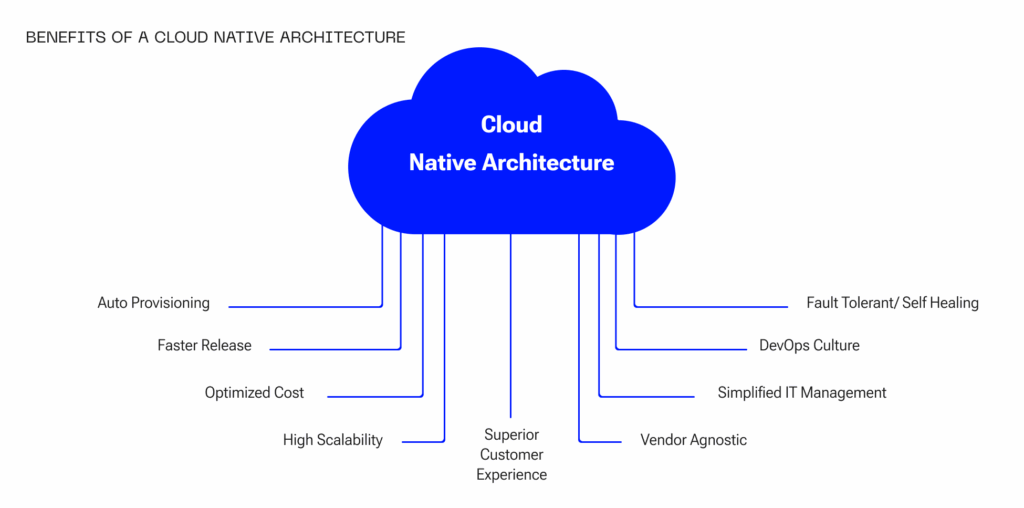
Like everything in tech (and in life), cloud-native architecture has its strengths and weaknesses. So let’s be honest: when is this approach a real game-changer, and when can it turn into a headache?
1. Scalability and Flexibility
Imagine your business is a small coffee shop, and suddenly hundreds of customers show up instead of the usual twenty. With a cloud-native application, you simply add resources on the fly. Everything scales automatically, with no need to rush out and buy additional servers.
2. Faster Delivery of Updates
Cloud Native allows you to release updates like hotcakes. Want to roll out a new feature? No more late-night deployments, everything is automated and CI/CD-tested. The result: faster feature delivery and quicker bug fixes.
3. Resilience
When your application is built from microservices, the failure of a single component doesn’t bring the entire system down. For example, if the email-sending service crashes, the application can still accept orders.
4. Cost Optimisation
Instead of paying for expensive servers 24/7, you only use the resources you need right now. This approach also saves you from server downtime that is simply “standing still.”
5. Independence
Cloud-native apps rely on containers and standardised interfaces like Kubernetes, which makes them independent of any specific cloud provider. That is why you can easily move workloads between different clouds or even on-premises servers.
6. Standardisation
Because cloud-native development relies heavily on open standards, like Docker, Kubernetes, CI/CD, you get consistent development, testing, and operations practices. This reduces errors, simplifies integrations, and makes system management more predictable.
7. Automation
Cloud-native architecture leans heavily on automation for deployment, management, and scaling. This reduces manual labour, accelerates workflows, and boosts the overall efficiency of DevOps teams.
8. Zero Downtime
Cloud-native applications are designed to stay online even when individual components fail. Microservices and automated management processes minimise downtime and keep the system running smoothly.
1. Architectural Complexity
It all starts with a simple question: are you ready?
Building a cloud-native application isn’t just flipping a switch. It requires a deep understanding of microservices, orchestration, and modern infrastructure. It’s complex, time-consuming, and demands highly skilled specialists.
2. High Learning Curve
Your team will need to master tools and practices such as Docker, Kubernetes, Terraform, and Helm, and that takes both time and money. If developers are used to working with monoliths, the transition can feel painful.
3. Dependency on Cloud Providers
The deeper you dive into a specific provider’s ecosystem (AWS, Google Cloud, Azure), the harder it becomes to “detach” later. Over the long term, this dependency can limit your business's flexibility. Vendor lock-in is real, and must be planned for.
4. Potential DevOps Costs
Cloud-native architecture helps optimise infrastructure costs, but the cost of a qualified DevOps team may increase. Automation won’t configure itself, and without experts who understand the full ecosystem, smooth operation is impossible.
Despite all the advantages of cloud-native architecture, the past few years have brought a wave of enthusiasm that isn’t always justified. Many companies struggle with a full migration to microservices, and in some cases, a hybrid monolith turns out to be the more practical approach.
A hybrid monolith is an architectural model where the core application remains monolithic, while specific functional components are extracted into microservices. This approach allows companies to:
It’s crucial to weigh the risks and costs of moving to cloud-native. You shouldn’t rewrite an entire application just to follow a trend. A hybrid approach may be the optimal solution, especially when business requirements and team capacity are taken into account.
Alright, let’s say you're excited about the idea of cloud-native architecture. But when is it actually the right fit for your project, and when is it better to avoid it? Let’s break down the scenarios where this approach unlocks its full potential, and the cases where it may be more than you need.
1. Startups Growing at Breakneck Speed
You’ve just launched, and suddenly users are joining by the tens of thousands. A classic monolithic architecture will most likely collapse under that surge. Cloud-native systems, with automatic scaling, let you keep up with explosive growth.
Example: a food-delivery app. If tomorrow you receive 100,000 new orders, you can scale only the services you need, like order processing and geolocation, instead of the entire application.
2. Platforms With Highly Variable Load
If your product depends on demand spikes, e-commerce during Black Friday, or streaming during major live events, cloud-native is perfect. You can scale resources up during peak traffic and scale down when things calm down, optimising costs.
Example: a streaming platform that handles millions of requests during the football championship.
3. Products Requiring Frequent Updates
If your team ships features weekly or even daily, cloud-native architecture lets you automate deployments through CI/CD. That means zero-downtime updates, and users always get the latest version.
Example: a task-management SaaS product where continuous improvements are a competitive advantage.
4. Global Services
If you have users worldwide, cloud-native architecture helps you deploy applications across multiple cloud regions closer to end customers, ensuring low latency and high availability.
Example: a social network that needs equally fast load times in the USA, India, and Europe.
1. Small Projects
If you’re running a simple landing page or a corporate website with a fixed, predictable audience, cloud-native likely won’t pay off. Why adopt microservices and Kubernetes if everything runs perfectly on a single server?
2. Internal Corporate Systems
If the application is used only inside your organisation and the load is consistently low, complex cloud architectures may not be necessary at all.
3. Limited Budget or Team Capacity
If you lack the resources to train your team or hire DevOps specialists, adopting cloud-native may become an overwhelming effort. Sometimes, sticking to traditional solutions is wiser than breaking everything in the name of a trend.
Cloud-native changes the way software is built, giving teams the tools to create more flexible, scalable, and resilient applications. But adopting this model requires a deep understanding of the technologies, careful planning, and a clear view of the risks.
For companies ready to embrace that change, the benefits are significant: faster development, better stability, and an architecture prepared to meet future challenges.

Let’s start with the central question: what does “cloud-native” actually mean? It’s not nearly as complicated as it sounds.

Redis is a high-performance, in-memory NoSQL database that enables developers to work with diverse data types quickly and efficiently.

Discover why databases are the backbone of modern IT—powering innovation, scalability, and security in a data-driven world.